Elevating Your Designs with Decorative Animal Silhouettes with Flora
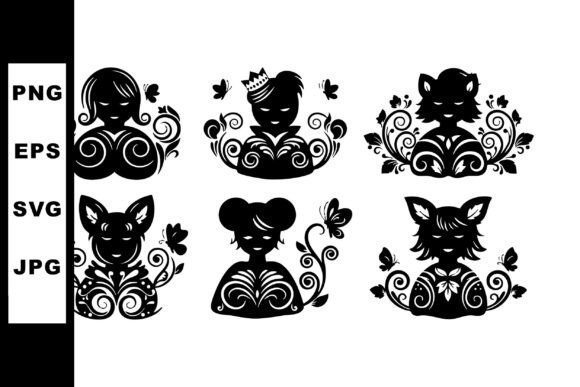
There is a distinct charm in combining the raw, recognizable shapes of wildlife with the delicate intricacy of botanical elements. Decorative Animal Silhouettes with Flora offer exactly this blend, providing six black animal silhouettes filled with intricate floral and swirl patterns. These assets are not just simple clipart; they are elegant and artistic tools designed for creative and ornamental design purposes. Whether you are a seasoned graphic designer, a small business owner creating branding materials, or a hobbyist working on a home decor project, understanding how to leverage these vector features correctly can make the difference between a amateur-looking result and a professional masterpiece.
The appeal of these silhouettes lies in their versatility. Because they come in a downloadable ZIP containing SVG, EPS, JPG, and PNG files, they bridge the gap between digital flexibility and print readiness. However, many creators rush into using such assets without fully considering the technical nuances or the design context, leading to frustrating outcomes. By approaching these resources with a bit more foresight, you can avoid common pitfalls that often undermine the quality of the final product.
Understanding File Formats and Common Selection Errors
One of the most frequent misunderstandings involves the file formats included in the package. When you download the ZIP, you are greeted with four different types: SVG, EPS, JPG, and PNG. A common mistake is assuming they are all interchangeable for every purpose. For instance, a beginner might choose the JPG version for a large-scale vinyl cut or a logo that needs to be resized frequently. This is a critical error because JPGs are raster images; enlarging them results in pixelation and loss of clarity, which destroys the elegance of the intricate floral patterns inside the silhouette.
To avoid this, always prioritize the vector files (SVG or EPS) for any project requiring scaling. Vector graphics use mathematical paths rather than pixels, meaning your deer, fox, or bird silhouette will remain crisp whether it is printed on a business card or blown up for a storefront window. Reserve the PNG files for web use where transparency is needed but scaling is not an issue, and use JPGs only for static, fixed-size previews. Checking your intended output medium before selecting a file saves time and ensures the highest quality presentation.
Navigating Complexity in Ornamental Design
The defining feature of these assets is the "intricate floral and swirl patterns" filling the black animal shapes. While beautiful, this complexity can lead to application errors if not managed carefully. A frequent oversight occurs when users apply these silhouettes to backgrounds that are too busy or dark. Since the primary shape is a black silhouette, placing it against a dark background causes it to disappear, while a chaotic background can compete with the internal floral details, making the design look muddy and unreadable.
A better approach is to treat the silhouette as a focal point. Use high-contrast backgrounds, such as white, cream, or soft pastels, to let the black shape pop. If you must place it over a complex image, consider using the SVG file to change the fill color of the silhouette to white or a brand color, effectively turning it into a negative space cutout. This simple adjustment maintains the decorative style while ensuring the artwork communicates clearly. Remember, the goal of ornamental design is to enhance, not overwhelm.
Misjudging Scale and Detail Resolution
Another area where creators often stumble is regarding scale. The swirl patterns and floral motifs inside the animals are detailed by nature. When these designs are shrunk down too small—for example, on a social media avatar or a small favicon—the fine lines merge together, turning into an indistinguishable blob. This reduces the perceived value of the design and fails to showcase the artistic effort put into the vectors.
Before finalizing your design, test the silhouette at its actual output size. If the internal details vanish, it is a sign that the image is too small for that specific asset. In such cases, consider using a simpler version of the icon if available, or reserve these detailed Decorative Animal Silhouettes with Flora for larger applications like posters, t-shirts, packaging, or wall art where the intricacy can be appreciated. Matching the complexity of the asset to the size of the medium is a hallmark of professional design judgment.
Licensing and Commercial Usage Considerations
For entrepreneurs, marketers, and freelancers, the legal aspect of using downloaded assets is paramount. A significant misunderstanding arises when users assume that purchasing or downloading a file grants unlimited rights. While many marketplaces offer generous licenses, it is essential to read the specific terms attached to the ZIP file you download. Some licenses may restrict the number of physical items you can sell (e.g., up to 500 t-shirts) or prohibit using the raw vector files as standalone logos without modification.
Ignoring these details can lead to costly legal issues or the need to rebrand later. To stay safe, verify if the license allows for commercial use, whether attribution is required, and if there are limits on print runs. If you plan to use one of the six animal silhouettes as a core part of a trademarked logo, ensure the license permits exclusive modification or consider tweaking the design significantly to make it unique to your brand. Being proactive about licensing protects your business and gives you peace of mind.
Optimizing Workflow for Efficiency
Efficiency is often lost when designers do not organize their assets properly upon download. It is tempting to dump the ZIP contents directly into a project folder and sort later, but this leads to confusion when you need a specific format quickly. A practical habit is to create a dedicated library folder structure immediately after downloading. Separate your vectors from your rasters, and perhaps even categorize them by animal type or style.
Furthermore, when working with SVG or EPS files in software like Adobe Illustrator, CorelDRAW, or Inkscape, take a moment to ungroup and inspect the paths. Sometimes, intricate designs contain stray points or overlapping paths that can cause issues with cutting machines like Cricut or Silhouette. Cleaning up the vector paths before sending them to production prevents material waste and ensures smooth cutting lines. This small step of "pre-flighting" your files demonstrates a professional level of care and attention to detail.
Making the Right Choice for Your Project
Ultimately, the value of these six black animal silhouettes lies in how well they align with your creative vision. They are best suited for projects that demand a touch of nature-inspired elegance, such as wedding invitations, boutique branding, nursery decor, or artistic prints. Before committing to a design direction, ask yourself if the ornamental style fits the tone of your message. If your brand is ultra-modern and minimalist, these swirling floral patterns might clash; however, for bohemian, rustic, or classic aesthetics, they are perfect.
By avoiding the traps of incorrect file usage, poor contrast choices, improper scaling, and overlooked licensing terms, you empower yourself to use these tools effectively. The key is to respect the intricacy of the design and match it with the right technical execution. When used thoughtfully, Decorative Animal Silhouettes with Flora become more than just digital files; they transform into compelling visual stories that resonate with audiences and elevate the overall quality of your creative work.